
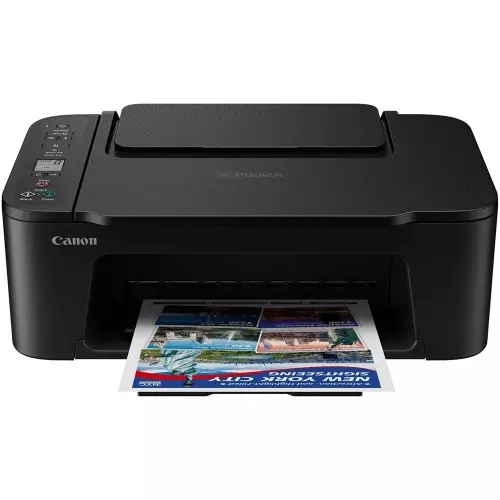
Canon PIXMA TS3640 3-in-1 Wireless Printer Price, Features & Specifications in Kenya:
The Canon PIXMA TS3640 3-in-1 Wireless Printer price in Kenya is KES 11,500. It is a budget-friendly, entry-level all-in-one printer for home users, students and small offices.Workstyles for today? This compact all-in-one printer is designed for convenience and adaptability, printing, scanning and copying plus wireless and mobile functionality.
Compact Design & Everyday Convenience:
The Canon PIXMA TS3640 is designed for ease of use and convenience. It is 435 × 327 × 145 mm in dimensions allowing it to be easily placed on desks, shelves or study tables without taking up too much space. That makes it a great choice for home offices, dorm rooms and other small business spaces where space is at a premium.The body is scratch resistant so it lasts over time and looks clean and professional even when handled frequently. It weighs 4.0 kg so it’s light enough to move around when you’re reorganising your workstation.The built-in 1.5-inch mono LCD screen makes it easy to set up Wi-Fi, check ink levels or pick copy settings, and delivers clear status updates. The printer is user-friendly for even a beginner with the straightforward operation via buttons.
High-Quality Printing Performance:
The print quality for the TS3640 is one of the best in its price range.Powered by Canon’s FINE (Full-photolithography Inkjet Nozzle Engineering) technology, it produces accurate ink droplets for clear text and beautiful colour reproduction.Users can expect crisp black text for documents and assignments, rich, brilliant colours for presentations and photographs, and smooth gradients and fine detail in photo prints with a maximum resolution of 4800 × 1200 dpi.This printer is ideal for everyday needs such as schoolwork, reports, and occasional office papers with print speeds of 7.7 ipm for black and 4.0 ipm for colour. Not the fastest, but the quality of the output makes up for the moderate speed.If you’re a photo enthusiast, the printer can print a 4” x 6” borderless photo in around 65 seconds, giving it a terrific alternative for reproducing memories at home without a professional lab.
All-in-One Functionality: Print, Scan & Copy:
The TS3640 is more than a printer, it is a comprehensive document solution. It’s 3-in-1 feature lets users print papers, scan photographs and produce copies with one compact device. The resolution of the CIS flatbed scanner goes up to 600 × 1200 dpi which is enough for scanning documents for digital storage, taking clean photographs for sharing or archiving and basic graphic work. The copy feature is simple and fast, allowing for the speedy replication of documents without the need for a computer. This is particularly important for students, teachers and small businesses who deal with routine paperwork.
Seamless Wireless & Mobile Printing:
The TS3640 has excellent wireless capabilities and today’s users need flexibility. You may print without wires or a central network using the built-in Wi-Fi and Wi-Fi Direct. It supports mobile printing so you can print instantly from your smartphone or tablet with the Canon PRINT App, Apple AirPrint and Mopria. This lets you print photographs, PDFs, emails and documents from your device in seconds.PIXMA Cloud Link also allows for printing from cloud storage services, allowing users to view and print files stored online without having to download the files to their computer first.
Flexible Paper Handling & Media Support:
The rear paper tray on the printer holds between 60 and 100 sheets of paper, which is good for mild to moderate use. It may not be built for heavy-duty office work, but it does a solid job of handling everyday printing. It supports a variety of paper sizes including A4, A5, B5, letter and legal envelopes and numerous photo formats. The TS3640 is flexible in the sorts of paper it may use, from plain paper for documents to glossy and photo paper for photographs, to speciality media for creative projects. That versatility lets users work on everything from school assignments to printing photos to the odd creative project.
Efficient Ink System & Cost Management:
The Canon PIXMA TS3640 employs a two-cartridge system, PG-445 (Black) and CL-446 (Colour). The printer also supports XL cartridges (PG-445XL and CL-446XL) for those who want to cut printing expenses with much higher page yields (up to 400 pages in black XL and up to 300 pages in colour XL). That brings down the cost per page and therefore makes it cheaper for the heavy user. Cartridge-based systems are cheap to replace and maintain, but customers who print a lot may want to consider the continuous costs of ink.
Canon PIXMA TS3640 Full Specification:
| Model Name | Canon PIXMA TS3640 |
| Printer Type | Wireless Inkjet All-in-One |
| Functions | Print, Scan, Copy |
| Print Technology | Canon FINE Inkjet System (2 cartridges) |
| Print Resolution | Up to 4800 × 1200 dpi |
| Print Speed (Black) | 7.7 ipm |
| Print Speed (Color) | 4.0 ipm |
| Photo Print Speed | 65 sec (4" × 6") |
| Borderless Printing | Yes (various sizes) |
| Duplex Printing | Manual |
| Scanner Type | CIS Flatbed |
| Scan Resolution | Up to 600 × 1200 dpi |
| Copy Function | Yes |
| Display | 1.5" – 3.8 cm Mono LCD |
| Connectivity | Wi-Fi, Wi-Fi Direct, USB 2.0 |
| Mobile Printing | Canon PRINT App, Apple AirPrint, Mopria |
| Cloud Printing | Yes (PIXMA Cloud Link) |
| Paper Input Capacity | 60 – 100 sheets (rear tray) |
| Supported Paper Sizes | A4, A5, B5, Letter, Legal, Envelopes, Photo sizes |
| Paper Types | Plain paper, photo paper, glossy paper |
| Ink Cartridges | PG-445 (Black), CL-446 (Color) |
| XL Cartridge Support | Yes (PG-445XL, CL-446XL) |
| Approx. Ink Yield (Black) | 180 pages (Standard), ~400 pages (XL) |
| Approx. Ink Yield (Color) | 180 pages (Standard), ~300 pages (XL) |
| Operating Systems | Windows, macOS, iOS, Android |
| Dimensions | 435 × 327 × 145 mm |
| Weight | 4.0 kg |
| Power Consumption | 9W (operation), 0.8W (standby) |
| Design Features | Compact, scratch-resistant body |
| Additional Features | Wireless printing, mobile printing, borderless photo printing |
| Price | 11,500 |
| Warranty | 1 Year |
Canon PIXMA TS3640 Pros & Cons:
Pros
Powerful print resolution with excellent photo quality
Compact and lightweight design ideal for small spaces
Easy wireless and mobile printing support
Affordable price in Kenya for budget users
Supports borderless photo printing
Cons
No automatic duplex printing (manual only)
Moderate print speeds may not suit heavy workloads
Limited paper capacity for large offices
Ink cartridges may increase long-term costs
FAQs
- Is the Canon PIXMA TS3640 good for home use?
Yes, it is ideal for home users due to its compact size, affordability, and multifunction capabilities. - Can I print directly from my phone?
Yes, it supports mobile printing via Canon PRINT App, Apple AirPrint, and Mopria. - Does it support photo printing?
Yes, it offers high-resolution borderless photo printing. - What is the advantage of XL cartridges?
XL cartridges provide higher page yields, reducing the cost per print. - Is it suitable for business use?
It is best suited for small offices or light workloads rather than high-volume printing environments.