
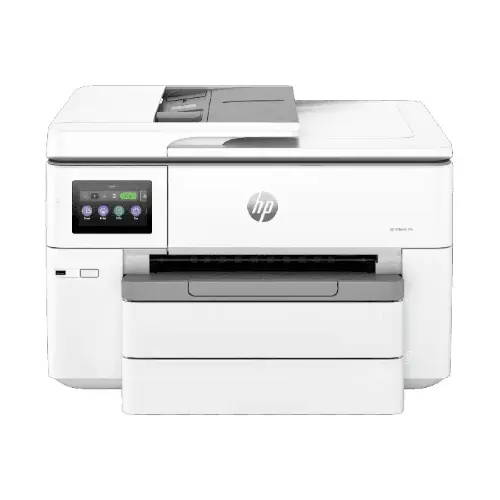
HP OfficeJet Pro 9720 Wide Format All-in-One Printer Price, Features & Specifications in Kenya:
The HP OfficeJet Pro 9720 Wide Format All-in-One Printer price in Kenya is KES 29,000. It is a very good value for money mid to high end office printer. The price tag matches its sophisticated capabilities though, especially when it comes to its wide-format A3 printing, which you don’t normally see in normal office printers at this price. For companies who would have outsourced large format printing, this printer can make a big difference in the long term operational costs. The model is meant to be productive and versatile, and integrates printing, scanning and copying into one compact device. This is the excellent answer for small to medium size organisations, corporate offices, schools and even creative professionals like designers and architects that need larger print formats and high quality output. The printer also features high print speeds, wireless connectivity, mobile printing capabilities and an intuitive touchscreen interface in addition to its main functionalities, designed to support current workflows.These capabilities allow customers to work productively from desktops, laptops or mobile devices. All in all, the HP OfficeJet Pro 9720 is built to provide constant performance, professional-grade results, and reliable productivity, making it a wise purchase for anyone who needs more than just basic printing.
Wide Format Printing for Professional Results:
A standout feature of the HP OfficeJet Pro 9720 is its A3 wide-format printing capability which enables users to create larger documents in-house instead of outsourcing. This is particularly valuable for organisations that print posters, architectural drawings, spreadsheets, marketing materials and presentations frequently.
Borderless printing (up to 11 x 17 inches) lets you print edge-to-edge with no ugly white margins, making your prints seem professional. The larger format printing gives you the flexibility and visual impact you need for client documents or internal reports. It can handle a range of paper sizes and types from ordinary office paper to glossy brochures, for everyday printing needs and more specialized printing requirements.
Fast Performance for Busy Work Environments:
The HP OfficeJet Pro 9720 offers fast print speeds of up to 22 pages per minute (ppm) black and 18 ppm colour so you can complete large print jobs quickly.
Draft mode (up to 34 ppm) is good for documents where quality is not crucial and suitable for internal papers and rough copies. The 1.2 GHz processor allows the printer to manage several activities without slowing down, while keeping continuous performance.
You won’t wait around for the printer to get going, with a first page out time of just 12 seconds (black). This can be especially useful in shared office scenarios when several users need simple access to printing capabilities.
High-Quality Printing and Scanning:
This printer is known for its quality. HP Thermal Inkjet technology delivers sharper text and brilliant colour prints for professional documents and creative projects. Crisp, true to life and detailed images with a maximum colour resolution of 4800 x 1200 optimised dpi. This makes the printer ideal for printing high-quality photos, brochures and marketing materials that require visual high quality. The flatbed scanner with 35-sheet Automatic Document Feeder (ADF) makes scanning simple and fast. Scan one page on the flatbed or up to 35 pages in the ADF for fast multipage scanning. The scanner provides 1200 dpi resolution for clear digital images perfect for digital archives or electronic distribution.
Smart Connectivity and Mobile Printing:
The HP OfficeJet Pro 9720 comes with several connection modes for seamless connection in modern workplaces like Wi-Fi, Ethernet and USB 2.0. You’ll also get dual-band Wi-Fi (2.4GHz and 5GHz) which ensures a more stable and faster connection and self-healing Wi-Fi that automatically detects and fixes connection issues, minimising downtime. One of the biggest advantages is the ability to print from mobile devices, so you can print from your smartphone or tablet directly with support for Apple AirPrint, Mopria, Wi-Fi Direct, HP Smart App and Chrome OS. So you can print remotely, without being tethered to a computer, perfect for dynamic work environments and hybrid offices.
Efficient Paper Handling and Productivity:
The HP OfficeJet Pro 9720 is built to handle heavy workloads and it will do so without issue. It includes a 250-sheet input tray so you won't have to keep loading paper, and a 75-sheet output tray to keep your documents organized. The 35-sheet Automatic Document Feeder (ADF) allows you to scan and copy multi-page documents in batches without manual intervention, significantly increasing productivity. This is especially useful when you need to do administrative work or digitise documents. The printer can handle high volume jobs, with a monthly duty cycle of up to 30,000 pages. For best performance and longest life, use the product within the recommended range of 250 – 1,500 pages per month.
User-Friendly Design and Interface:
The HP OfficeJet Pro 9720 is very easy to use. A 2.7-inch capacitive touchscreen offers a smooth, intuitive user interface for navigating settings, submitting print jobs and managing workflows. Its menu system is simple enough that even the first time user can operate the printer with a minimum of learning curve. Scan to email, change print settings and connect to Wi-Fi quickly and efficiently. The printer can print in wide formats, but the printer is still relatively compact and professional in its design, making it at home on office desks or in shared workspaces.
Energy Efficiency and Ink System:
This printer uses a four cartridge ink system (Black, Cyan, Magenta, Yellow) so you only need to replace the colour you've run out of. This reduces waste and operational costs in the long run. Compatible with HP 938, HP 938e EvoMore ink cartridges means higher page yields and efficiency. This makes the printer a cost-effective choice for businesses that print a lot. The printer is also energy-efficient, meaning it is made to use less power without lowering performance. This is an important feature for businesses that want to cut costs.
HP OfficeJet Pro 9720 Wide Format All-in-One Printer Full Specifications:
| Model Name | HP OfficeJet Pro 9720 |
| Model Number | 53N94C |
| Functions | Print, Copy, Scan |
| Printer Type | Wide Format Color Inkjet All-in-One |
| Print Technology | HP Thermal Inkjet |
| Display | 2.7-inch Capacitive Touchscreen CGD |
| Processor Speed | 1.2 GHz |
| Print Speed Black (ISO) | Up to 22 ppm |
| Print Speed Color (ISO) | Up to 18 ppm |
| Draft Print Speed Black | Up to 34 ppm |
| Draft Print Speed Color | Up to 34 ppm |
| First Page Out Black | As fast as 12 sec |
| First Page Out Color | As fast as 13 sec |
| Print Resolution Black | Up to 1200 x 1200 rendered dpi |
| Print Resolution Color | Up to 4800 x 1200 optimized dpi |
| Monthly Duty Cycle | Up to 30,000 pages |
| Recommended Monthly Volume | 250 – 1,500 pages |
| Duplex Printing | Automatic (A4/Letter) |
| Borderless Printing | Yes, up to A3 / 11 x 17 inches |
| Print Languages | HP PCL3 GUI |
| Scanner Type | Flatbed + ADF |
| Scan Resolution | Up to 1200 dpi |
| Automatic Document Feeder | 35-sheet ADF |
| Copy Function | Yes |
| Fax Function | No (varies by region; some versions include fax) |
| Standard Input Capacity | 250-sheet input tray |
| Output Capacity | 75-sheet output tray |
| Maximum Envelope Capacity | Up to 30 envelopes |
| Supported Media Sizes | A3, A4, A5, A6, B5 (JIS), DL, C5, C6, Chou #3, Chou #4, Hagaki |
| Media Types | Plain paper, photo paper, matte brochure paper, glossy brochure paper, presentation paper, recycled paper, thick paper |
| Supported Media Weight | 34 to 250 g/m² |
| Recommended Media Weight | 60 to 105 g/m² |
| Connectivity | Hi-Speed USB 2.0, Ethernet, Wi-Fi |
| Wireless | Dual-band Wi-Fi 802.11 a/b/g/n/ac |
| Mobile Printing | Apple AirPrint, Mopria, Wi-Fi Direct, HP App, Chrome OS |
| Operating Systems (Windows) | Windows 10, Windows 11 |
| Operating Systems (Mac) | macOS 11 Big Sur, macOS 12 Monterey, macOS 13 Ventura, macOS 14 Sonoma |
| Other OS Support | Linux, Chrome OS |
| Standard Memory | 512 MB |
| Maximum Memory | 512 MB |
| Dimensions (W x D x H) | 581 x 445 x 306 mm |
| Package Dimensions | 677 x 495 x 408 mm |
| Weight | 14.6 kg |
| Package Weight | 19.5 kg |
| Ink Cartridge Count | 4 (Black, Cyan, Magenta, Yellow) |
| Compatible Ink | HP 938 / HP 938e EvoMore cartridges |
| Cable Included | No USB cable included |
| Special Features | Wide-format A3 printing, borderless printing, wireless printing, self-healing Wi-Fi |
| Price | 29,000 |
| Warranty | 1 Year |
HP OfficeJet Pro 9720 Pros & Cons:
Pros
Powerful wide-format A3 printing capability
Fast print speeds suitable for office use
Excellent print quality with high resolution
Multiple connectivity options including mobile printing
Automatic duplex printing saves paper
Reliable ADF for multi-page scanning
Cons
No fax functionality in standard models
No USB cable included in the box
Relatively large footprint for small desks
Ink cartridges may be costly over time
FAQs
• Is the HP OfficeJet Pro 9720 suitable for small businesses?
Yes, it is ideal for small to medium-sized businesses due to its speed, efficiency, and wide-format capabilities.
• Can it handle high-volume printing?
Yes, with a duty cycle of up to 30,000 pages, it can handle demanding workloads.
• Does it support wireless printing?
Yes, it supports Wi-Fi, Wi-Fi Direct, and mobile printing apps.
• Can I print borderless documents?
Yes, it supports borderless printing up to A3 size.
• What type of ink does it use?
It uses HP 938 and HP 938e EvoMore ink cartridges.
More Options:
HP LaserJet Pro MFP 4103dw Printer (2Z627A)