
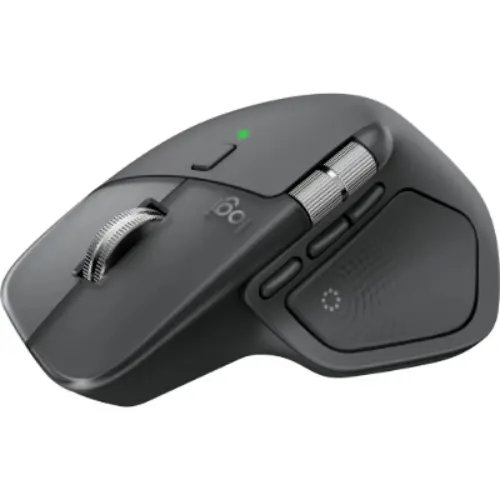
Logitech MX Master 4 Wireless Mouse in Kenya
The Logitech MX Master 4 price in Kenya is KES 17,000. It is a high-performance wireless productivity mouse that introduces two genuinely new capabilities to the MX Master series: a Haptic Sense Panel with customisable tactile feedback that lets you feel your actions as you work, and an Actions Ring that brings your most-used tools and shortcuts directly to your cursor in a dynamic overlay, saving up to 33% of mouse action time. It also features an 8000 DPI Darkfield sensor that tracks on any surface including glass, MagSpeed electromagnetic scrolling at up to 1,000 lines per second, Quiet Click technology, 2x stronger wireless connectivity via a new Logi Bolt USB-C receiver, and up to 70 days of battery life with 1-minute quick charging. The Logitech MX Master 4 is available in Kenya with a 2-year warranty, exclusively at Jumbo Mart in Nairobi.
Highlights:
- Haptics: Haptic Sense Panel for customisable tactile feedback
- Actions Ring: Shortcut overlay at the cursor, 33% faster mouse workflows
- Sensor: 8000 DPI Darkfield, tracks on glass
- Scrolling: MagSpeed, up to 1,000 lines per second
- Connectivity: 2x stronger Logi Bolt USB-C and Bluetooth
The First MX Mouse with Haptics: Precision You Can Feel
The single most significant addition in the MX Master 4 over every previous MX Master model is the Haptic Sense Panel, a physical haptic feedback system built into the top of the mouse beneath your palm. This is not a vibration motor, but a precision actuator that delivers differentiated tactile sensations for specific actions. When scrolling reaches the end of a page, you feel it. When snapping a window into position on Windows 11, you feel the alignment. When confirming an action from the Actions Ring, you feel the selection. Each of these haptic responses is individually configurable in Logi Options+, allowing you to assign the type, intensity, and trigger condition for feedback across different applications and actions. For professional users in Kenya who spend long hours in creative applications, productivity tools, and multi-window workflows, the addition of haptic feedback adds a physical dimension to mouse interaction that makes the MX Master 4 feel meaningfully different from any previous version or any competing mouse at this price.
Actions Ring: Bring Your Tools to the Cursor
The Actions Ring is a digital overlay shortcut system unique to the MX Master 4. Pressing the dedicated Actions Ring button opens a circular menu of up to eight customisable shortcuts directly at the cursor position, visible on screen over any application. You scroll through it by rotating the thumb wheel and select a shortcut by pressing the wheel or clicking. This means your most frequently used tools, filters, adjustments, brush sizes, opacity settings, layer controls, or any other shortcut can be accessed at exactly where your cursor already is, without moving to the menu bar, right-clicking through a context menu, or reaching for a keyboard shortcut. Logitech's own Ergo Lab study measured this as saving up to 33% of mouse action time for typical power user workflows in creative and productivity applications. The Actions Ring adapts per application, showing different shortcuts when you switch between Photoshop, Premiere Pro, PowerPoint, Excel, and other tools, configured entirely within Logi Options+.
2x Stronger Wireless Connectivity with USB-C Logi Bolt
The MX Master 4 ships with a new generation Logi Bolt USB-C receiver rather than the USB-A receiver of the MX Master 3S. The redesigned radio chip and optimised antenna placement deliver 2x stronger wireless signal compared to the MX Master 3S, maintaining a more reliable, low-latency connection in congested wireless environments such as open-plan offices in Nairobi with many simultaneous wireless devices. Logi Bolt remains fully encrypted and FIPS compliant for secure enterprise use. Bluetooth Low Energy provides an alternative connection path for devices without available USB ports, and the mouse pairs with up to three devices with Easy-Switch button access.
8000 DPI Darkfield Sensor: 5x More Precise Than a Standard Mouse
The MX Master 4 uses Logitech's Darkfield 8000 DPI optical sensor, which tracks on any surface including glass (minimum 4mm thickness), delivering precision that is 5x greater than a standard mouse at default DPI settings. Sensitivity is adjustable between 200 and 8000 DPI in Logi Options+, allowing fine-tuning to exactly the right level for your display size, resolution, and working style. This precision is felt most clearly in detailed work where pixel-accurate cursor placement matters, such as vector design, photo retouching, spreadsheet navigation, and code editing.
MagSpeed Scroll Wheel and Quiet Clicks
The MX Master 4 retains the MagSpeed electromagnetic scroll wheel from the MX Master 3S, capable of scrolling at up to 1,000 lines per second in free-spin mode and switching automatically to precise click-by-click ratchet scrolling when needed. Quiet Click technology reduces primary click noise by 90% compared to standard mice, making the MX Master 4 a considerate choice in shared offices, quiet home workspaces, and library or co-working environments across Nairobi. The horizontal thumb scroll wheel provides additional lateral navigation for wide spreadsheets, design canvases, and timelines.
Windows 11 Advanced Haptics and Logitech Flow
The MX Master 4 supports native Windows 11 Advanced Haptics integration, activated via a Windows 11 update from March 2026 onwards. This enables system-level haptic feedback for native Windows 11 actions including window snapping, alignment in PowerPoint, and other compatible app interactions, controlled directly from Windows OS settings rather than requiring Logi Options+ configuration. Logitech Flow enables seamless cursor movement between two or more connected computers with copy-paste and file transfer between machines, controllable from a single MX Master 4 without re-pairing.
Built With 54% Recycled Plastic and Improved Stain Resistance
The MX Master 4 is built with 54% post-consumer recycled plastic in the Graphite and Black variants, and the battery uses 100% recycled cobalt. The thumbwheel aluminium is made using renewable energy. Compared to the MX Master 3S, the surface material on the MX Master 4 has improved stain resistance and polished microtextures that maintain a cleaner appearance over long hours and years of professional use. The ergonomic right-hand shape remains the same sculpted, palm-supporting form that has defined the MX Master series, with the natural tilt and intuitive button placement designed to reduce hand stress during extended working sessions.
Logitech MX Master 4 Full Specifications:
| Model | Logitech MX Master 4 (MR0116) |
| Released | October 2025 |
| Hand Orientation | Right-handed |
| Haptic Sense Panel | Yes, customisable per action, shortcut, and notification |
| Actions Ring | Yes, 8-slot digital overlay shortcut ring |
| Sensor | Darkfield 8000 DPI optical |
| DPI Range | 200 to 8000 DPI (adjustable in Logi Options+) |
| Track-on-Glass | Yes (minimum 4mm glass thickness) |
| Precision vs Standard Mouse | 5x more precise at default DPI |
| Scroll Wheel | MagSpeed electromagnetic, dual-mode |
| Scroll Speed | Up to 1,000 lines per second |
| Thumb Wheel | Horizontal scroll and navigation |
| Click Technology | Quiet Clicks, 90% less noise |
| Number of Buttons | 7 programmable (plus Actions Ring) |
| Battery Life | Up to 70 days |
| Quick Charge | 3 hours use from 1 minute of charging |
| Charging Port | USB-C (cable sold separately) |
| Connectivity | Logi Bolt USB-C 2.4GHz and Bluetooth Low Energy |
| Signal Strength | 2x stronger than MX Master 3S |
| Logi Bolt Security | Fully encrypted, FIPS compliant |
| Bluetooth | Low Energy |
| Multi-Device Pairing | Up to 3 devices |
| Easy-Switch | Yes |
| Logitech Flow | Yes, cross-computer control and file transfer |
| Smart Actions | Yes, via Logi Options+ |
| Actions Ring | Yes, app-adaptive shortcut overlay |
| Windows 11 Advanced Haptics | Yes (Windows 11 update from March 2026 onwards) |
| Software | Logi Options+ |
| OS Compatibility | Windows 10/11, macOS 10.15+, Linux, Chrome OS, iPadOS 13.4+ |
| Certifications | Certified for Zoom, Works With Chromebook, Intel vPro |
| Included in Box | Mouse, Logi Bolt USB-C receiver |
| Charging Cable | Not included, sold separately |
| Recycled Plastic Content | 54% post-consumer recycled (Graphite/Black) |
| Battery Material | 100% recycled cobalt |
| Thumbwheel Material | Low-carbon aluminium (made with renewable energy) |
| Stain Resistance | Improved vs MX Master 3S |
| Colours | Graphite, Black, Pale Grey |
| Price in Kenya | KES 17,000 |
| Warranty | 2 Years |
Pros
- First MX Master mouse with a Haptic Sense Panel for customisable tactile feedback
- Actions Ring digital shortcut overlay saves up to 33% of mouse action time
- 8000 DPI Darkfield sensor tracks on glass and any surface
- 5x more precise than a standard mouse at default DPI
- MagSpeed electromagnetic scroll wheel at 1,000 lines per second
- Quiet Clicks reduce click noise by 90%
- 2x stronger wireless connectivity versus MX Master 3S via new Logi Bolt USB-C receiver
- Logi Bolt USB-C receiver with full encryption and FIPS compliance
- Up to 70 days battery life per charge
- 1-minute quick charge delivers 3 hours of use
- Native Windows 11 Advanced Haptics integration
- Logitech Flow for seamless multi-computer control and file transfer
- Actions Ring adapts per application for context-sensitive shortcuts
- Improved stain resistance and polished microtextures over MX Master 3S
- 54% post-consumer recycled plastic
- Certified for Zoom, Works With Chromebook, and Intel vPro
- 2-year warranty
Cons
- USB-C charging cable sold separately, not included in the box
- Right-handed design only, not suitable for left-handed users
- Haptics and Actions Ring require Logi Options+ on Windows or macOS for full functionality
- Windows 11 Advanced Haptics integration requires Windows 11 update from March 2026 onwards
- Actions Ring not yet supported on all applications at launch
- Heavier than ultralight mice, not suited for gaming